Included tools
Last updated:
Oscova Agents ships agent tools for files, commands, knowledge, connected services, automation and the Oscova Avatar Engine. Use this reference to see what each tool does, which approval it needs by default and what must be enabled before an agent can call it.
A listed tool is not automatically available to every agent:
- Ordinary catalogue tools must be selected for the agent or the task run scope.
- Local-only restrictions, approval policy and call, account or path limits still apply.
- Tool discovery can keep a selected tool hidden until the agent searches for it.
- Memory, Library and other runtime-provided tools are added through their feature settings, not Allowed Tools.
Note
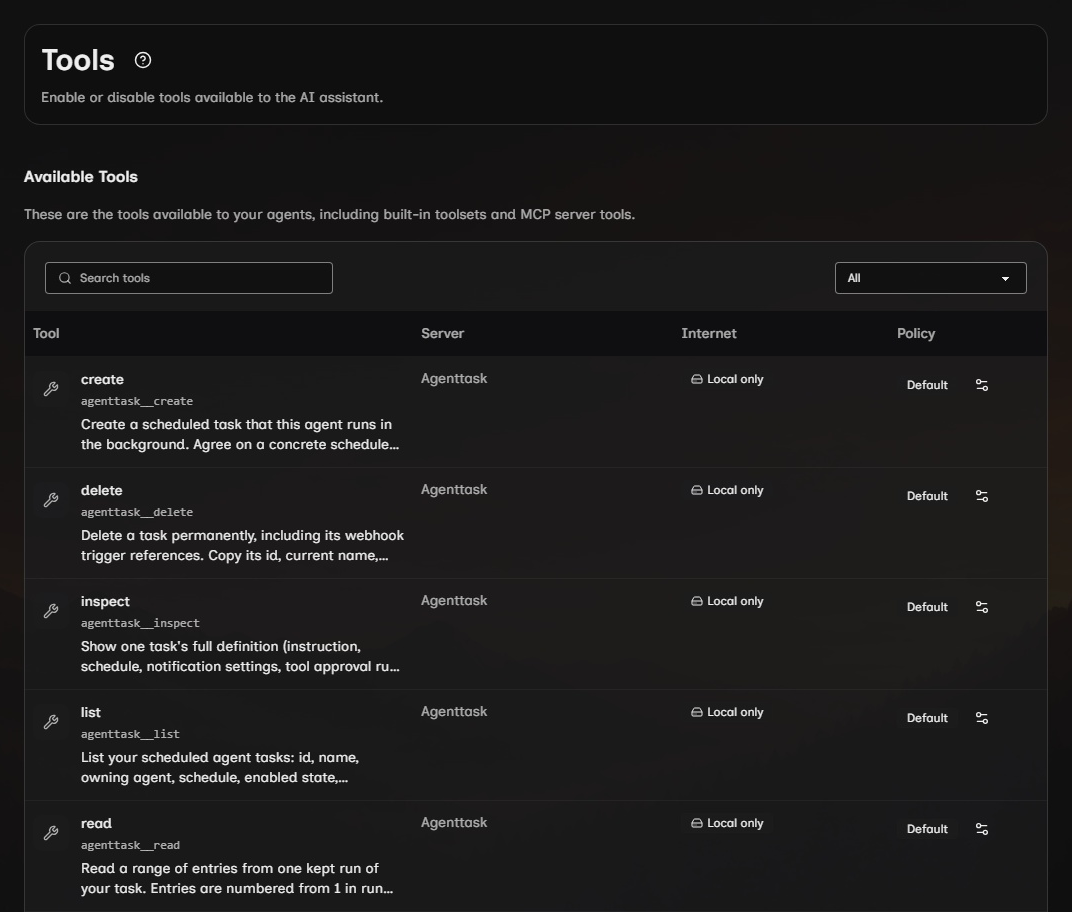
Open Settings > Tools for the current qualified names and policy state on your installation. Ordinary and encrypted file tools share base names such as read, but their qualified names identify the source, for example file__read and encryptedfile__read.
Workspace and execution
| Capability | Callable tools | Access or effect | Default approval | Available when |
|---|---|---|---|---|
| Workspace files | read, write, edit, apply_patch, grep, glob |
Reads or changes files, finds text or matching file paths inside granted workspaces. | Writes and edits are automatically approved. Patches require approval. | The tools are selected and the path is inside an allowed workspace. |
| Encrypted files | read, write, edit, apply_patch, grep, glob |
Reads, changes or searches encrypted .enc files inside granted workspaces. |
Writes and edits are automatically approved. Patches require approval. | The encrypted tools are selected, the Vault Password is unlocked and the path is allowed. |
| Directory listing | directory__list |
Lists folders and files without changing them. | No approval prompt. | The tool is selected and the directory is inside an allowed workspace. |
| PDF text | pdf__extract_text, pdf__search_text |
Reads or searches text in PDF files. | No approval prompt. | The tools are selected and the PDF is inside an allowed workspace. |
| Commands | shell__exec, shell__start, shell__read_output, shell__kill |
Runs commands, follows background output or stops a background command. | Starting, running and stopping commands require approval. | Command execution is enabled. In Docker execution, commands run in the configured container. |
| Host command escape | host_shell__exec |
Runs one command on the host instead of in the container. | Requires approval. | Docker execution is active and the tool is selected. Scheduled tasks and delegated surfaces without a web approval route do not receive it. |
| Date and time | datetime__get_current, datetime__convert |
Reads the current time or converts a time between zones. | No approval prompt. | The tools are selected. |
| Wait | wait__sleep |
Pauses the current run for 1 to 300 seconds. Stopping the run cancels the wait. | No approval prompt. | The tool is selected. |
Conversation recall tools come with Enable Memory while your Vault Password is unlocked. Select the encrypted readers explicitly when the agent needs to inspect saved long tool output.
Memory, knowledge and agent workflow
Memory tools are added by Enable Memory. Library tools are added by a Library workspace grant. Neither group needs a separate selection in Allowed Tools.
| Capability | Callable tools | What it affects | Available when |
|---|---|---|---|
| Conversation memory | memory__save, memory__read, memory__forget |
Reads, saves or removes the calling user's encrypted memory notes. | Memory is enabled for the agent. |
| Saved-chat discovery | chathistory__list, chathistory__read |
Finds titles and matching excerpts across your saved chats without an embedding index, then reads a numbered range of one chat's messages. | The tool is selected and your vault is unlocked. Incognito chats are excluded. |
| Selected speech | speech__speak |
Speaks supplied text through your saved Speech provider, voice and output destination. | The directly selected agent is running in web chat and synthesis is available. |
| Interactive visualizations | visualization__create, visualization__show, visualization__read, visualization__edit, visualization__delete |
Creates and manages encrypted interactive documents in the conversation. | The tools are selected in web chat and Offline and Local-only restrictions permit them. |
| Library | library__search, library__get_index_status |
Searches the managed Library or reports its indexing state. | The agent has a Library workspace grant. |
| Scheduled tasks | agenttask__list, agenttask__inspect, agenttask__read, agenttask__create, agenttask__update, agenttask__delete, agenttask__run |
Reviews and searches tasks and their run results, reads a run's transcript, changes task definitions or starts a run. | The tools are selected. Creating, changing, deleting and running tasks require approval. |
| User notifications | notification__notify |
Adds a notification for the signed-in user. | The tool is selected. |
| User questions | user_question__ask |
Presents one to four questions, each accepting one suggested answer or custom text. Submit continues the conversation. Cancel closes the card silently. | Selected directly in authenticated web chat. Enabled and pinned for new main agents, manually enabled for existing or custom agents. |
| Skill authoring | skillauthoring__create, skillauthoring__update |
Creates or changes a markdown skill package. | The tools are selected and the change is approved. |
| Skill registry | skillregistry__search, skillregistry__inspect, skillregistry__install |
Searches the online registry, reviews a result or installs a skill. | Internet access is allowed. Installation requires approval. |
| MCP registry | mcpregistry__search, mcpregistry__install |
Searches the online registry or installs an MCP server configuration. | Internet access is allowed. Installation requires approval. |
| Application logs | logs__read |
Reads application logs available to the calling user. | The tool is selected. |
Connected services and Internet
For plugin-provided services, the table shows base function names. The live qualified names also include the plugin identity, so select them from Settings > Tools instead of copying an older prefix.
| Service | Callable tools | Required setup | Data effect | Available when |
|---|---|---|---|---|
| Web page retrieval | web__fetch |
No connected account. | Sends a URL request and returns readable page content. | Internet access is allowed and the tool is selected. |
| Gmail | search_emails, read_email, send_email |
The Google Workspace plugin and a connected Google account. | Searches or reads messages in that account, or sends an email. | The matching account is connected and Internet access is allowed. Sending email may require approval. |
| Google Calendar | list, get |
The Google Workspace plugin and a connected Google account. | Lists or reads calendar events. | The matching account is connected and Internet access is allowed. |
| YouTube | list_subscriptions, check_new_uploads, get_video_details |
The Google Workspace plugin and a connected Google account. | Reads subscriptions, recent uploads or video details. | The matching account is connected and Internet access is allowed. |
| Outlook | list_emails, read_email, search_emails, send_email |
The Microsoft Graph plugin and a connected Microsoft account. | Reads account data or sends an email. | The matching account is connected and Internet access is allowed. Sending email may require approval. |
| Microsoft To Do | list_task_lists, list_tasks, create, update, delete |
The Microsoft Graph plugin and a connected Microsoft account. | Reads or changes task lists and tasks. | The matching account is connected and Internet access is allowed. Creating, updating or deleting data may require approval. |
Internet-classified tools are unavailable during local-only runs. Account-changing operations act on the connected external service, so review their arguments and approval policy before allowing a call.
Avatar Engine
| Capability | Callable tools | Visible effect | Available when |
|---|---|---|---|
| Avatar control | avatar__connect, avatar__list, avatar__select, avatar__list_emotions, avatar__set_emotion, avatar__set_background_color, avatar__set_resolution, avatar__set_presentation_settings, avatar__show_message, avatar__clear_message, avatar__check_health, avatar__speak, avatar__shutdown |
Connects to the engine, selects and presents an avatar, changes its visible state, speaks text, checks health or shuts the engine down. | The Avatar Engine is installed, running, reachable and the tool is selected. |
The engine must be paired to the Host before these tools can control it. If a tool reports that pairing or access needs attention, open Avatar settings to complete pairing. An agent tool cannot approve pairing for you. See the Avatar Engine guide for setup.
Runtime-provided tools
These tools are composed for an individual agent run and are not separate rows in Settings > Tools.
| Capability | Callable tools | Available when | Important boundary |
|---|---|---|---|
| Tool discovery | search_tools |
Tool discovery is enabled for the agent. | Search returns only selected tools that remain eligible for the current run. |
| Assigned skills | load_skill, read_skill_resource, run_skill_script |
The active agent has assigned skills. Script execution must also be enabled for run_skill_script. |
Skill reads are scoped to assigned packages. Script execution follows its configured execution mode and approval policy. |
| In-session todo list | todos_add, todos_complete, todos_remove, todos_get_remaining, todos_get_all |
Todo support is enabled for the active agent. | These todos organize the current run and are separate from Microsoft To Do. |
| Image analysis | analyze_image |
The selected model supports image input and the run includes vision support. | The image must be in an allowed location and is sent to the selected model provider. |
| Configured agents as tools | Dynamic names based on the target agents | The current agent is allowed to call one or more compatible agents. | The called agent keeps its own tools, file grants and local-only restrictions. |
Official plugins
| Plugin | Capability type | Callable tools | Required setup | Available when |
|---|---|---|---|---|
| Web | Agent tools | Base names search in Web and News, plus get_top_headlines in News |
Activate the plugin and configure the relevant user-supplied credential. | The plugin is active, its credential is available and Internet access is allowed. |
| Foundry Local | Model provider | None | Install and activate the plugin, then configure a local model. | The plugin is active and its model is ready. |
| LlamaSharp | Model provider | None | Install and activate the plugin, then configure a supported model file. | The plugin is active and its model is ready. |
| Local Speech Recognition | Whisper recognition provider, with separate CPU and CUDA editions | None | Install and activate the recognition plugin, then download its model. | The plugin is active and recognition is ready. |
| Local Speech Synthesis | Kokoro synthesis provider, with separate CPU and CUDA editions | None | Install and activate the synthesis plugin, then download its model. | The plugin is active and synthesis is ready. |
| OpenAI and ElevenLabs | Hosted speech providers | None | Install the chosen optional plugin and select its credential and provider settings. | The plugin is active and the saved speech configuration is usable. |
| Browser | Managed website tools | Inspect the Browser entries in the live catalog | Enable the Browser plugin and prepare Chromium on first use. | An authenticated web chat is active and its network policy permits browser tools. |
| Microsoft MXC and Docker | Shell and skill execution environments | Existing shell and skill tools | Select an available environment in operator Execution settings. Docker is optional. | The selected plugin and prerequisites are available on the execution device. |
Dynamic and installed tools
Installed MCP servers and custom plugins add tools whose names depend on your configuration, and configured agents can appear as dynamically named tools. Use Settings > Tools for the live catalog, and manage the sources in MCP servers, Custom agents and Plugins.