Toolsets
Last updated:
Oscova exposes callable operations as AIFunction instances in one synchronized tool catalogue. Built-in toolsets, plugin toolsets, and connected MCP servers all contribute to that catalogue, but a tool reaches a model only when the agent's allowed-tool and governance settings permit it.
Note
A toolset is a class whose public methods can be reflected into tools. A qualified tool name is the stable wire name used by agent definitions and policies, such as coding__read_file.
Know the three tool sources
| Source | Discovery and registration | Qualified-name shape | Lifetime |
|---|---|---|---|
| Built-in toolset | The runtime synchronizes an ICrewToolset through ToolsetRegistration. |
<owner>__<tool> |
The registered instance backs its reflected functions until the catalogue is synchronized again. |
| Plugin toolset | An enabled plugin registers a user-scoped factory with AgentPluginBuilder.AddToolset. |
<plugin-id>__<owner>__<tool> |
One instance is created while assembling each user scope and can serve multiple runs in that scope. Plugin activation changes require a host restart. |
| MCP tool | A connected server publishes existing AIFunction instances and their source metadata. |
<server-name>__<tool> |
Tools remain available while the server is connected. A disconnected server or exited STDIO process loses its tools. Reconnect operations update the catalogue live. |
IAgentOrchestrator.SyncTools is the public runtime synchronization boundary. It accepts reflected ToolsetRegistration entries, existing external AIFunction instances, and ExternalToolMetadata. Plugin authors normally use AddToolset. Users connect MCP servers through Settings rather than calling this boundary directly.
Create a reflected toolset
Implement the marker interface ICrewToolset. Public instance and static methods declared directly on the class become tools. Inherited methods do not.
using System.ComponentModel;
using Oscova.Agents;

public sealed class GreetingToolset : ICrewToolset
{
    [DisplayName("say_hello")]
    [Description("Returns a greeting for a name.")]
    public static string SayHello(
        [Description("Name to greet.")] string name)
    {
        return string.IsNullOrWhiteSpace(name)
            ? "A name is required."
            : $"Hello, {name}.";
    }
}
The reflected function has the qualified name greeting__say_hello. Reflection applies this contract:
[DisplayName]supplies the base tool name. Otherwise the .NET method name is used.[Description]supplies tool and parameter descriptions shown to the model.- Optional .NET parameters use their declared default when the model omits them.
- A
CancellationTokenparameter is supplied by the invocation runtime and omitted from the model-visible schema. [ToolPolicy]sets the default approval behavior. Without it, the default isToolApprovalMode.Default.[ToolNetworkScope]classifies network use. Without it, the default isNetworkScope.None.[WorkspacePath]marks a path parameter for containment checks. Its default access isWorkspacePathAccess.Read. Mutating paths must specifyWrite.[ConfidentialAgentOnly]exposes a reflected method or complete toolset only to confidential agents.[NonConfidentialAgentOnly]exposes a reflected method or complete toolset only to non-confidential agents. Conflicting markers fail closed.
Keep helpers private or move shared work into a normal service injected into the toolset. Every public method declared on the class is treated as a tool candidate.
The built-in WaitToolset is a minimal example of accepting and passing the invocation token:
[DisplayName("wait")]
[Description("Pauses the current agent run for a bounded duration when external work has no status handle, then returns so the agent can check again.")]
public static async Task<string> WaitAsync(
    [Description("Seconds to wait. Values below 1 use 1; values above 300 use 300.")]
    int durationSeconds,
    [Description("Short reason for the pause and what will be checked afterward.")]
    string reason,
    CancellationToken cancellationToken = default)
{
    if (string.IsNullOrWhiteSpace(reason))
    {
        throw new ToolFailureException("A reason for waiting is required.");
    }

    durationSeconds = Math.Clamp(durationSeconds, 1, 300);
    await Task.Delay(TimeSpan.FromSeconds(durationSeconds), cancellationToken).ConfigureAwait(false);
    return $"Waited {durationSeconds} seconds. Recheck the external state before continuing.";
}
The runtime passes the same token through reflected and MCP tool invocation. Honor it in downstream I/O so stopping a run also stops the work.
Compose an approval-gated host shell
HostShellToolset exposes one foreground tool, exec_host_command, for a harness that needs an explicit host command beside a sandboxed normal shell. Supply a factory that creates and initializes a ShellExecutor for the current run:
var hostShell = new HostShellToolset(createHostExecutorAsync);
The tool creates one executor per call and disposes it when the call completes, times out, or is cancelled. It declares ToolApprovalMode.RequireApproval and NetworkScope.Incidental. The surrounding harness still decides when the tool enters its catalogue and which run types may invoke it.
Do not treat approval as operating-system elevation. The executor runs with the host process user's permissions unless the harness provides a separately secured executor. Keep unattended-run exclusion, offline enforcement, workspace selection, and any native sandbox policy in the harness that creates the executor.
Register plugin toolsets
Register a plugin toolset factory from IAgentPlugin.Configure:
public void Configure(AgentPluginBuilder builder)
{
    builder.AddToolset(_ => new GreetingToolset());
}
Use the supplied AgentPluginContext when the toolset needs the current user's credentials, HTTP client, logger, or time zone. Do not store user or run state in static fields. See Plugin Builder for the complete factory and failure contract.
Follow the naming contract
ToolNaming normalizes each qualifier and tool segment before joining them with __:
- letters are lowercased.
- letters, digits,
_, and-are preserved. - each run of other characters becomes
_. /,\, and__split qualifier segments.- empty segments are discarded.
- names longer than 64 characters are truncated and end with
__plus the first eight lowercase hexadecimal characters of a SHA-256 hash.
The toolset owner is the class name with an exact trailing Toolset suffix removed, then normalized.
| Input | Qualified name |
|---|---|
Built-in class CodingToolset, display name read_file |
coding__read_file |
Plugin ID acme.search, class GreetingToolset, display name say_hello |
acme_search__greeting__say_hello |
MCP server GitHub, remote tool list_issues |
github__list_issues |
Agent allowed-tool lists and policies use the qualified name, not the .NET method name or an MCP server's unqualified tool name. Catalogue lookup is case-insensitive, while the originally published function name remains unchanged.
Qualified names must be unique across all sources. Publishing GitHub and github tools with the same normalized remote name is therefore a collision. Synchronization rejects a duplicate instead of silently replacing a function or its governance metadata, and a failed complete synchronization does not publish a partial replacement. Rename the tool, toolset, plugin ID, or MCP server so the qualified names differ.
Understand metadata and filtering
Each catalogue entry retains its qualified name and effective governance metadata. Reflected tools derive owner, original name, approval mode, and network scope from the toolset and attributes. External functions use ExternalToolMetadata for server name, original name, and network scope. MCP descriptions and argument schemas come from the remote server.
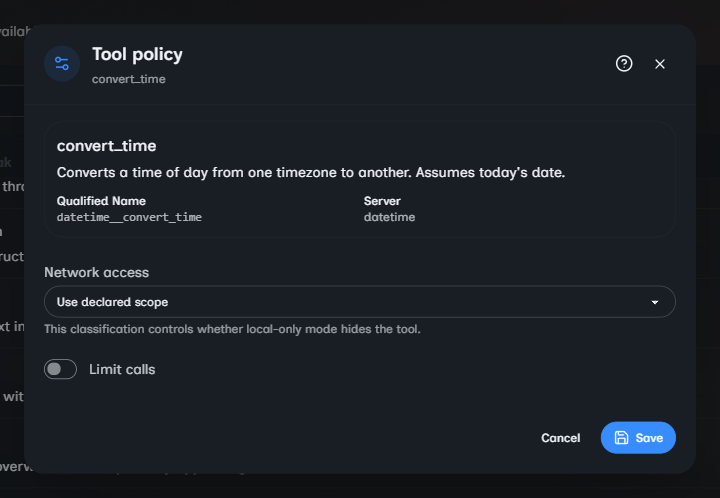
Public HTTP MCP endpoints are classified as NetworkScope.Egress, while local HTTP endpoints are Incidental. STDIO tools default to None because the command is local to its selected execution environment, but the process can still reach the network. In Settings, classify a network-oriented STDIO tool as Internet so offline enforcement can hide it.
Catalogue membership does not grant execution. When building an agent, AgentToolResolver starts with the agent's allowed qualified names and then:
- Omits names that are missing from the current catalogue.
- Applies reflected confidentiality markers. The current host exposes encrypted file tools only to confidential agents and withholds
memory_savefrom them while preserving memory reads. - Omits
NetworkScope.Egresstools for local-only or air-gapped agents. - Applies the effective tool policy.
- Omits denied tools, wraps approval-required tools, and exposes allowed tools as callable functions. A surface that cannot request approval omits approval-required tools instead.
Workspace path validation and other invocation middleware still run when the model calls an exposed tool. Visibility, approval, and input validation are separate protections.
Use tool search mode
With tool search enabled, an agent receives a smaller initial tool list:
- the
search_toolsdiscovery function. - pinned tools that are always visible.
- tools unlocked by earlier searches for that cached agent instance.
search_tools returns at most five lexical matches across qualified names, descriptions, and argument names. Matching tools can be added to the current run and remain unlocked for the cached agent instance. Pinned tools are excluded from search results because they are already present. The same eligibility and resolver rules still omit missing, confidentially restricted, denied, or disallowed network tools.
Write distinct display names and concrete descriptions. For example, search_customer_orders with a description that names its customer_id argument is easier to discover than a generic search tool.
Handle results, cancellation, and errors
- Throw
ToolFailureExceptionfor invalid arguments and operations the tool could not complete. Write its reason and optional fix for the agent to act on. - Return empty or domain-specific results normally when the operation itself completed.
- Keep failure reasons and fixes safe for conversation history. Do not include paths, host names, connection strings, credentials, or raw exception text.
- The harness automatically folds the third failure from the same tool and arguments into one result. Tool code does not need to track repeated failures.
- Let cancellation propagate. Do not catch
OperationCanceledExceptionand return success. - Pass
CancellationTokento HTTP, storage, process, and MCP operations. - Log unexpected exceptions at external boundaries, then let them propagate. The harness reports them opaquely, so do not turn them into plausible success text.
- Never rely on model instructions alone for paths, URLs, command text, credentials, IDs, or authorization checks.
Tool instances may serve concurrent runs. Keep per-call data local, make mutable shared state safe, and do not start background work that outlives the public tool or plugin lifecycle.
Troubleshoot discovery
If a tool does not appear or cannot be called, check these in order:
- Confirm the source is active: the built-in registration exists, the plugin loaded after restart, or the MCP server is connected.
- Find the exact qualified name in Settings. Do not guess it from the friendly label.
- Confirm the agent's allowed-tool list contains that qualified name.
- Check whether the agent is confidential and the host intentionally restricts that function.
- Check for a denied policy or a network-scope restriction.
- In tool search mode, pin the tool or search using terms from its name, description, or argument names.
- Check load and connection diagnostics for duplicate normalized names, invalid reflected metadata, factory failures, or remote errors.