Build Your First Plugin
Last updated:
Plugins add trusted in-process .NET contributions to Oscova. The host discovers plugin manifests for administration, then loads only valid plugins explicitly enabled by an administrator at startup.
Note
In-process means the plugin code runs inside the Oscova application process. It is not sandboxed, so install only plugins you trust.
Prerequisites
You need the .NET 10 SDK and an Oscova.Agents reference compatible with the host version. You also need administrator access to enable the installed plugin.
Create the project
Create a class library that targets .NET 10. The following project shape supports local development and keeps Oscova's framework assembly out of the plugin package:
<Project Sdk="Microsoft.NET.Sdk">
  <PropertyGroup>
    <TargetFramework>net10.0</TargetFramework>
    <ImplicitUsings>enable</ImplicitUsings>
    <Nullable>enable</Nullable>
    <EnableDynamicLoading>true</EnableDynamicLoading>
    <IsPackable>true</IsPackable>
    <PackageId>Example.Hello</PackageId>
    <Version>1.0.0</Version>
    <PackageType>OscovaPlugin</PackageType>
  </PropertyGroup>

  <ItemGroup>
    <PackageReference Include="Humanizer.Core" Version="2.14.1" />
    <ProjectReference Include="../Oscova.Agents/Oscova.Agents.csproj"
                      Private="false"
                      PrivateAssets="all" />
  </ItemGroup>

  <ItemGroup>
    <None Include="oscova-plugin.json" Pack="true" PackagePath="\">
      <CopyToOutputDirectory>PreserveNewest</CopyToOutputDirectory>
      <CopyToPublishDirectory>PreserveNewest</CopyToPublishDirectory>
    </None>
  </ItemGroup>
</Project>
Adjust the project-reference path for your checkout. If the plugin is built outside the Oscova source tree, use the matching Oscova.Agents package version instead. A plugin compiled against an incompatible framework contract may fail to load.
Implement the entry point
Every plugin entry type implements IAgentPlugin. The entry point must have a public parameterless constructor because the loader creates it with Activator.CreateInstance.
using System.ComponentModel;
using Oscova.Agents;
using Oscova.Agents.Plugins;

namespace Example.Hello;

public sealed class MyAgentPlugin : IAgentPlugin
{
    public void Configure(AgentPluginBuilder builder)
    {
        builder.AddToolset(context => new MyToolset(context.UserTimeZone));
    }
}

public sealed class MyToolset(TimeZoneInfo userTimeZone) : ICrewToolset
{
    [DisplayName("say_hello")]
    [Description("Returns a friendly greeting with the user's local time.")]
    public string SayHello(string name)
    {
        var localTime = TimeZoneInfo.ConvertTime(DateTimeOffset.UtcNow, userTimeZone);
        return $"Hello, {name}. Your local time is {localTime:t}.";
    }
}
The AddToolset factory is registered during startup and invoked later for each user scope. Use its AgentPluginContext for credentials, named HTTP clients, logging, and the user's time zone. Do not reach into the host dependency-injection container.
Keep Configure and the toolset factory cheap and synchronous. Neither API accepts a cancellation token. Do not block on asynchronous work, call remote services, read credentials, or start background work while the plugin is loading. Tool methods can perform cancellable asynchronous work when the tool contract requires it.
AgentPluginBuilder also supports AddModelProvider, AddSpeechRecognitionProvider, and AddSpeechSynthesisProvider. Start with one toolset. Add provider contributions only when the plugin implements the corresponding public provider interface.
Add the manifest
Add oscova-plugin.json to the project root. The project file above copies it beside the built assembly and places it at the package root.
{
  "id": "example.hello",
  "name": "Example Hello Tools",
  "version": "1.0.0",
  "assembly": "Example.Hello.dll",
  "entryType": "Example.Hello.MyAgentPlugin"
}
The assembly path is relative to the manifest directory and must stay inside that directory. entryType is the fully qualified name of the public class that implements IAgentPlugin.
Build and install locally
Build the plugin:
dotnet build -c Release
Oscova discovers plugins from app_data/plugins by default. If OSCOVA_APP_DATA_DIR is set, the plugin root is under that directory instead.
app_data/
  plugins/
    example.hello/
      oscova-plugin.json
      Example.Hello.dll
      other-plugin-dependencies.dll
Copy the manifest, plugin assembly, dependency metadata, and plugin-private dependencies from the build output. Keep dependency files at the paths described by the generated dependency metadata.
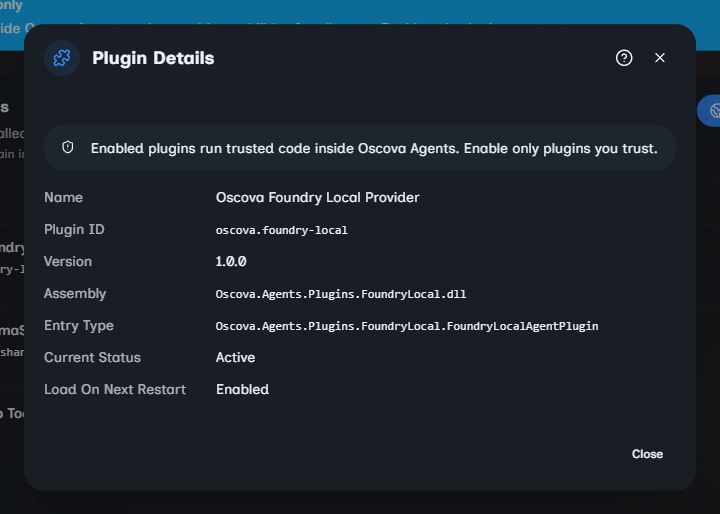
After copying files, open Settings > Orchestration > Plugins as an administrator. Review the manifest details, turn on Load On Next Restart, save, and restart the host.
Plugin files are discovered before they are enabled. A newly installed plugin remains inactive until an administrator saves the activation choice and restarts.
Understand the activation boundary
On startup, Oscova validates discovered manifests, filters them against the saved activation list, loads each enabled assembly, creates its IAgentPlugin entry point, and calls Configure. Successful contributions remain loaded for the life of that host process.
Installing files, enabling or disabling a plugin, or replacing its assembly does not change the running process. Save the activation choice and restart the host. Oscova does not hot-unload or hot-reload plugins.
Package for online install
If you publish through the online plugin browser, package the plugin as a NuGet package with package type OscovaPlugin. The installer expects oscova-plugin.json at the package root and the declared assembly as a selected net10.0 runtime asset. Ordinary PackageReference dependencies such as Humanizer.Core stay in the NuGet dependency graph.
The installer downloads the latest stable version from NuGet.org, restores managed, native, and resource dependencies for the current supported RID, and writes the loadable component into one plugin directory. It does not install analyzers, build assets, tools, scripts, or content, and it does not support dependencies on another Oscova plugin. The requested plugin package must not exceed 25 MB.
See Plugin Settings for the complete package shape and administration workflow.
Validate the plugin
Before distributing the plugin, verify:
- the manifest is present and its
assemblyandentryTypevalues match the build output. - the entry type is public, implements
IAgentPlugin, and has a public parameterless constructor. - a clean test plugin root contains all plugin-private dependencies.
- the plugin appears as valid in administration before you enable it.
- the plugin becomes active only after saving Load On Next Restart and restarting.
- reflected tool names are the qualified names you intend to make available to agents.
Troubleshooting
The plugin is installed but inactive
Installation only makes the plugin discoverable. Enable Load On Next Restart, save, and restart the host.
The manifest is invalid
Check that every required value is present, the assembly path is relative and contained within the plugin folder, and the named assembly exists. Duplicate plugin IDs are compared without regard to case. Only one can be loaded.
The plugin fails to load
Check the administration diagnostic. Confirm that entryType names a public IAgentPlugin implementation with a public parameterless constructor, and that all required plugin-private dependencies were copied. An exception from the constructor or Configure skips that plugin while other valid plugins continue loading.
The plugin is active but its toolset is missing
Check the runtime logs for a toolset-construction failure, then verify credentials and other user-scoped inputs used by the factory. A failing factory skips that contribution for the affected user without unloading the plugin. Active tools must also be made available through the agent's tool configuration.
A rebuilt plugin still behaves like the old version
Replace the complete plugin output, stop the running host, and restart it. Plugin load contexts remain active for the process lifetime.