Model Providers
Last updated:
Model providers are per-user saved connections for chat responses, scheduled task runs, conversation memory, and semantic Library search. Speech uses its own provider settings.
Note
Model means the AI system that produces text or embeddings. Provider means the saved connection details Oscova uses to reach that model.
Chat providers
A chat provider answers messages. Oscova supports local GGUF models, Ollama, OpenAI, Groq, OpenRouter, NVIDIA NIM, Google Gemini, Anthropic, and generic OpenAI-compatible endpoints. LM Studio is available as an OpenAI-compatible preset.
Local GGUF is available when the Oscova LLamaSharp provider plugin is installed and enabled. Foundry Local is available through its own provider plugin on Windows x64, Linux x64, and Apple Silicon macOS. Intel macOS is not supported. Foundry Local does not require an API key. Restart Oscova after installing or enabling either plugin.
Each provider stores the information needed to call that model, such as model ID, endpoint, credential reference, context window, cost rate, and capability flags. Choose the provider type first when editing so Oscova can apply known defaults.
Provider rows show the selected model, endpoint, credential state, cost rate, capability badges, last test result, and whether the provider is the default or fallback. Row actions let you edit, duplicate, test, or delete a provider. Opening the row shows the provider details without changing it. If no default exists, the first provider added becomes the default.
Provider editor details
The editor has a Provider tab and a Chat Options tab.
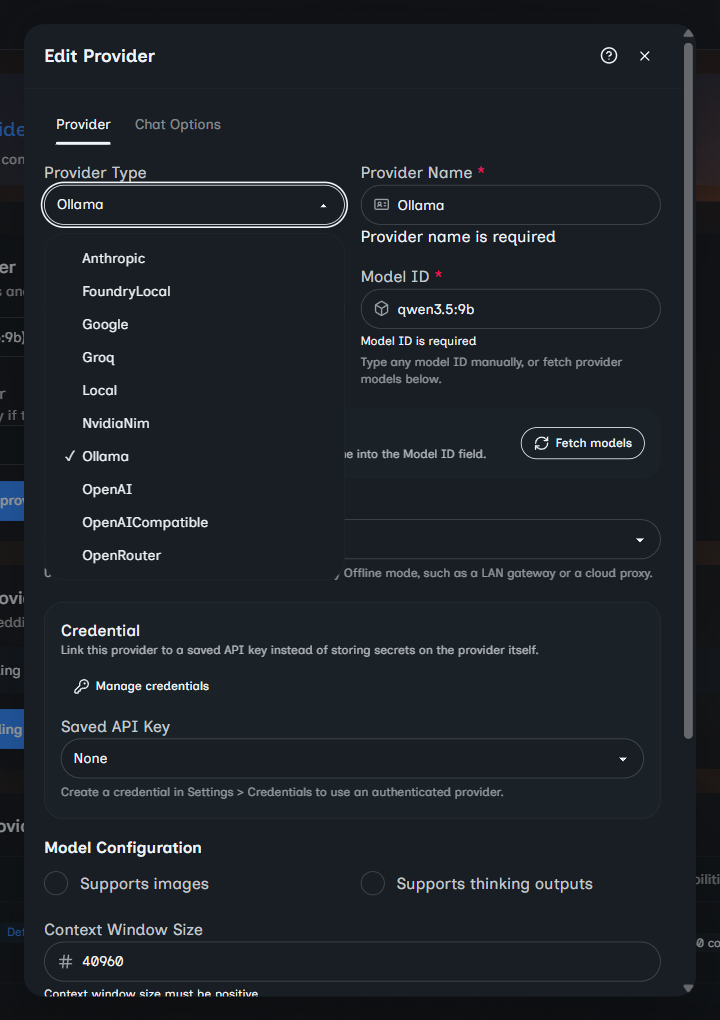
On the Provider tab:
- Provider Type controls the known defaults Oscova applies.
- Provider Name is the label shown in selectors and tables.
- Local providers choose a GGUF file from the local models folder and can download a direct HTTP or HTTPS GGUF URL.
- Hosted and compatible providers use Base URL when the provider needs or allows an endpoint override.
- Fetch models asks supported providers for available model IDs. When the provider returns metadata, choosing a fetched model can fill the context window and capability flags.
- Download-capable providers also show license details and installation state for the selected model. For Foundry Local, review the license and select Download model before saving the provider. Downloads use Foundry Local's own model cache instead of the GGUF models folder.
- Endpoint scope can stay on auto-detect or be forced to Treat as local or Treat as cloud for Offline mode.
- Saved API Key links to a credential. Use Manage credentials when you need to create or update the secret first.
- Supports images tells Oscova the provider can inspect images. When a chat run uses that provider, an image analysis tool becomes available for supported image attachments and local image paths.
- Supports thinking outputs, Context Window Size, and Cost per 1M tokens describe runtime behavior and reporting.
- Context Window Size also powers web-chat preflight warnings when a draft is estimated to exceed the selected model's usable input window.
- Ollama providers can set Keep alive, which controls the
keep_alivevalue sent with chat requests. Leave it blank to use the Ollama server default. Values such as5mand1hkeep the model loaded for that duration,-1keeps it loaded indefinitely, and0unloads it after the response.
On the Chat Options tab, tune request defaults such as temperature and related sampling limits. Leave values at provider defaults unless you know the model needs a different style.
If you cancel a Foundry Local download or it fails, select Download model again to retry it.
Note
Thinking outputs are model reasoning-style outputs exposed by providers that support them. Oscova stores the flag on the provider and passes it through supported runtime paths, including Ollama and OpenAI-compatible providers where the provider implementation can honor it.
Runtime precedence
When a chat or task runs, provider choice is resolved in this order:
- A provider selected for that single chat run or task.
- The selected agent's saved provider override.
- The user's default chat provider.
The fallback provider applies only when the user's default provider is selected. It is tried if that provider cannot initialize or fails before response content is emitted. A provider chosen for one run, task, or agent is not wrapped by the default fallback.
Embedding provider
An embedding provider converts text into vectors so Oscova can search memory by meaning.
Note
Embedding means a numeric representation of text. Similar text produces similar vectors, which makes memory search possible.
Embedding configuration is separate because the best chat model is not always the best memory-search model. The vector dimensions must match the embedding model output.
The embedding editor asks for provider type, name, optional base URL, model ID, vector dimensions, endpoint scope, and a saved credential. Provider types that do not support embeddings are not offered. NVIDIA NIM is currently chat-only in Oscova, so it is excluded from the embedding selector.
Saving a changed embedding identity resets conversation-memory vectors and queues Library reconciliation. Identity includes the selected provider, type, base URL, model ID, and vector dimensions. Library source files are preserved and re-embedded. Semantic results can be incomplete while rebuilding.
Important
Agent memory requires both an embedding provider and Enable Memory on the agent. Chat can work without embeddings, but cross-session memory cannot.
Health checks and costs
Use Test after creating or editing a provider. A successful test proves the provider's current health check passed. It does not guarantee the configured model or every future prompt will work.
Estimated cost in the metrics dashboard uses the cost rate saved on the provider when usage is recorded. Keep rates current if you rely on cost summaries.
Offline mode and endpoint scope
Offline mode blocks public internet providers and egress tools during agent runs. Oscova classifies provider endpoints by their effective URL:
- Local GGUF providers are local.
- Foundry Local providers are local.
- Loopback, private LAN, link-local, and unique-local IPv6 addresses are treated as local.
- Public hosted endpoints are treated as cloud.
- Endpoint scope overrides auto-detection when a custom proxy or gateway would otherwise be classified incorrectly. Forcing Treat as local also overrides protection for a public URL, so use it only for a trusted endpoint.
Agent-level Local only follows the same provider blocking rules even when global Offline mode is off. This also applies to embedding search and indexing.
Safe provider changes
- Add and test a replacement provider before deleting an old one.
- Keep at least one default chat provider selected for normal chat.
- Link saved credentials for hosted providers that require API keys.
- Deleting a provider clears default or fallback selection when necessary and removes matching agent and task overrides.
- Revisit embedding settings before changing dimensions after memories already exist.
- Use Endpoint scope sparingly. It changes how local-only enforcement treats the provider.