Choose an AI Engine
Last updated:
Oscova Agents needs a model provider before agents can answer. Pick the provider shape that matches your privacy, speed, cost, and maintenance needs.
Note
Model provider means a saved connection to a local or hosted AI model. A chat provider answers messages. An embedding provider turns text into searchable vectors for memory.
Provider choices
- Local runs a downloaded GGUF model file on the machine hosting Oscova.
- Foundry Local discovers and downloads supported local models from its provider-owned catalog.
- Ollama connects to an Ollama server by base URL and model name.
- OpenAI uses a saved OpenAI API key and hosted endpoint.
- OpenRouter uses an API key and an OpenAI-compatible gateway for many model families.
- OpenAI-compatible connects to another service or proxy that follows OpenAI-style APIs.
- NVIDIA NIM connects to NVIDIA-hosted OpenAI-compatible chat models.
- Google, Anthropic, and Groq use their own hosted provider settings.
- LM Studio is available as an OpenAI-compatible preset for a local server.
Local GGUF is available when the Oscova LLamaSharp provider plugin is installed and enabled. Restart Oscova after installing or enabling the plugin.
During onboarding, the Model step appears after the required profile-picture choice. Your vault is already unlocked, so a hosted API key can be fetched and saved without leaving onboarding. Oscova shows the available choices in a scrollable provider row: Ollama, LM Studio, Local GGUF, Foundry Local, OpenAI, then the remaining hosted providers alphabetically. The generic OpenAI-compatible option is intentionally left for Model Providers settings. Model setup can be skipped and completed later.
You can keep more than one chat provider. Providers belong to the signed-in user, and every role can manage its own provider list. Your default provider is used unless a chat run, task, or agent has an override.
Add or edit a provider
Open Model Providers settings and select Add custom provider. Choose the provider type first. Oscova fills common endpoint, model, capability, and chat-option defaults for that type. Then set the name, model ID, optional base URL, credential reference, context window, cost rate, and capabilities.
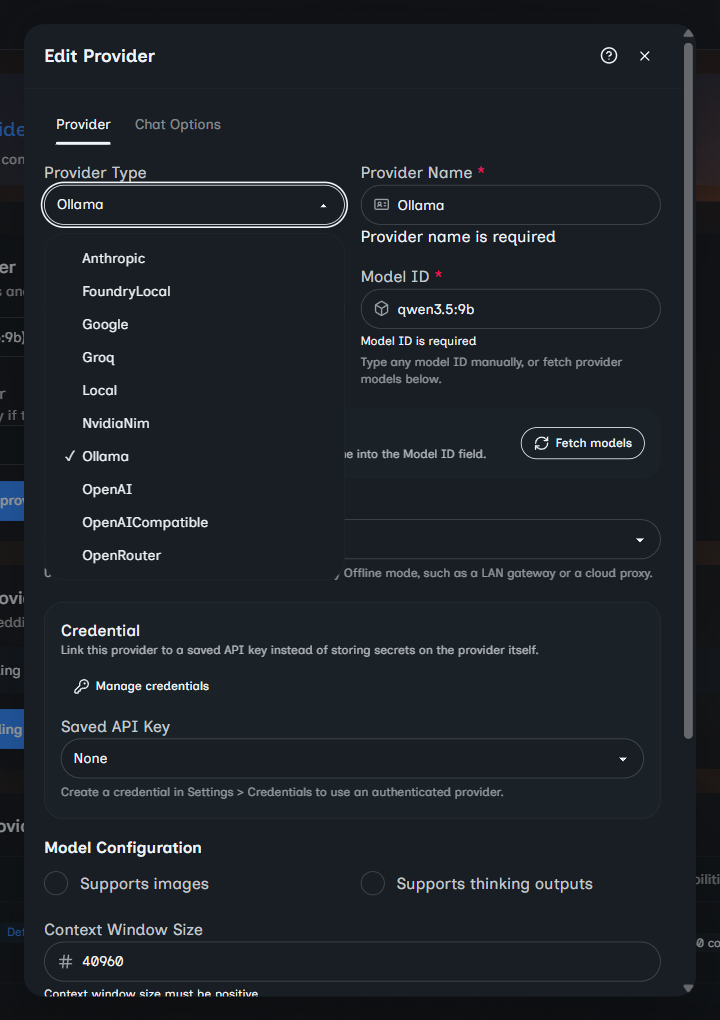
Existing providers can be opened for details, edited, duplicated, tested, or deleted. The Default Provider and Fallback provider dropdowns save immediately.
The first provider you add becomes the default when no default exists. A fallback only protects runs using that default. It is tried when the default cannot start or fails before response content appears. It does not wrap a chat, task, or agent override.
For hosted and OpenAI-compatible providers, Fetch models can load model IDs from the provider. When the provider reports metadata, choosing a fetched model can also fill the context window and capability checkboxes. These values stay editable.
For Local, choose an existing .gguf file or paste a direct HTTP or HTTPS download URL. Oscova normalizes Hugging Face /blob/ links, downloads into its local models folder, and selects the file after a successful download. Keep the dialog open until the download finishes or cancel it.
Use Endpoint scope when Offline mode classifies a custom endpoint incorrectly:
- Auto-detect checks the effective endpoint host.
- Treat as local keeps a LAN gateway or local proxy usable in local-only runs.
- Treat as cloud blocks a proxy or remote endpoint when local-only runs are active.
Only force Treat as local when you trust the endpoint. That override changes the egress decision even if the URL is public.
Use credentials
Hosted providers usually need a saved API key credential. Create the credential in Credentials settings, then link it from the provider form. OpenRouter model discovery can list public models without a key, but chat requests still need a valid credential.
Important
Do not paste API keys into prompts, system instructions, personal context, or task instructions. Use saved credentials instead.
Memory requires embeddings
Agent memory and semantic Library search need an embedding provider in addition to the chat provider. The embedding provider has its own model ID and vector dimensions. Those dimensions must match the embedding model output.
Changing the selected embedding provider, provider type, base URL, model ID, or vector dimensions resets conversation-memory vectors and queues Library reconciliation. Source files remain in the Library. Oscova re-embeds them with the new identity. Until rebuilding finishes, semantic results can be incomplete.
Embedding provider choices are filtered to provider types that support embeddings. Embedding entries never appear in chat-provider selectors. Local GGUF, Google, Anthropic, and NVIDIA NIM are chat-only in Oscova.
Troubleshooting
- If chat is disabled, confirm at least one chat provider exists and a default is selected.
- If a provider test fails, check the endpoint, model ID, credential, and local service state. A passing connection test does not prove every prompt will succeed.
- If Local fails, confirm the GGUF file exists and the process can read it.
- If Ollama fails, confirm the server is running and the model name exists in Ollama.
- If memory or Library search is unavailable, configure a valid embedding provider and wait for indexing. Agent recall also requires memory enabled on the agent.