Scheduling
Last updated:
A schedule is the timing rule attached to an agent task. Pick the simplest trigger that matches the work and review the selected agent before enabling unattended actions.
Note
Schedule here includes timed triggers, task-chain triggers, and optional webhook triggers. The task instruction still decides what the agent actually does.
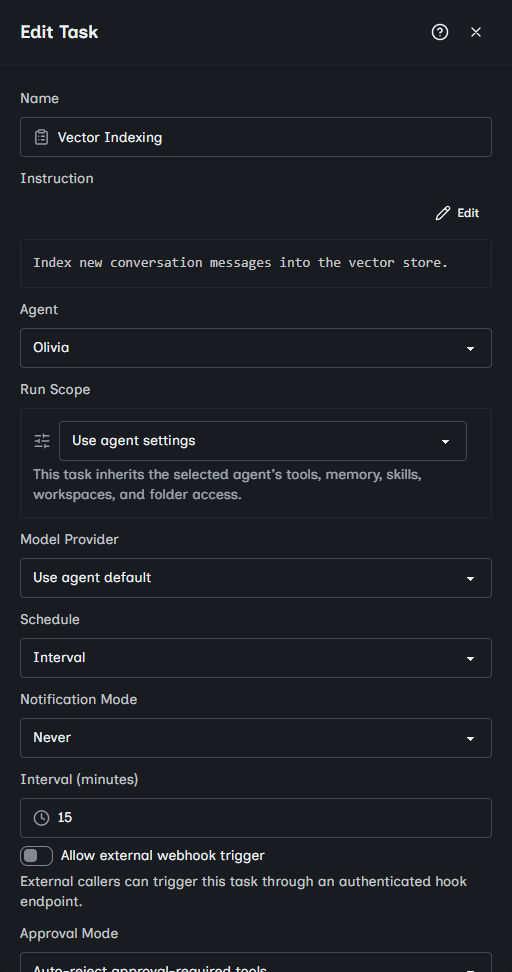
Interval schedules
Use Interval for simple repeating work such as every 30 minutes. Avoid very short intervals for expensive tasks or tasks that call external APIs.
Interval tasks are due immediately if they have never run. After that, Oscova waits until the configured number of minutes has passed since the last completed or failed run. If the previous run is still running, the scheduler skips that tick instead of starting a second copy.
Tip
Pick an interval longer than the task usually takes. A 15-minute task scheduled every 5 minutes will spend most ticks waiting for the previous run.
One-shot schedules
Use One-shot for a single future run. This is useful for delayed checks, reminders, or one-time maintenance.
One-shot tasks do not retry automatically after a failed run. Fix the failure and use Run now to retry. The task disables or deletes itself only after a completed run when configured that way.
Cron schedules
Use Cron for recurring calendar patterns. Choose the timezone intentionally, especially when the task needs to align with a team, customer, or office location.
Note
Cron is a compact pattern for recurring times, such as every weekday morning.
Examples:
30 9 * * 1-5runs at 09:30 Monday through Friday.0 */6 * * *runs every 6 hours.0 8 1 * *runs at 08:00 on the first day of each month.
Caution
Invalid cron expressions cannot be saved. If a saved cron task never runs, verify that it is enabled and review its expression and timezone before changing model settings.
Task-chain triggers
Use After another task when a task should run only after a specific upstream task completes successfully. A chained task cannot run after itself and should not also be treated like a timer.
If the upstream task is deleted, the chained task no longer receives a successful-completion trigger. Its schedule shows Deleted task until you choose another upstream task.
Webhook triggers
Use webhook triggers when another system should start the task. Webhooks require a task webhook API key from an administrator and valid request parameters when the task defines required fields.
External webhook triggers use the task's saved webhook slug. Slugs are normalized before lookup, and ambiguous slugs are rejected so a caller cannot accidentally start the wrong task.
Webhook-triggered runs use the same saved instruction, agent, run scope, model override, approval mode, and notification mode as scheduled or manual runs. The trigger payload only supplies allowed parameters. It does not rewrite the task definition.
Pause or run manually
Pause a task from the task list when you want to keep its definition but stop future runs. Pausing does not cancel a run already in progress. Run now uses the same saved instruction, agent, provider, run scope, approval behavior, and notification settings as scheduled runs.
Paused tasks do not run on their schedule and cannot be started with Run now until they are enabled again. Disabled tasks with webhook triggers also return not found to external callers.